<?xml version="1.0" encoding="utf-8"?>
<feed xmlns="http://www.w3.org/2005/Atom">
    <id>http://icyfe.cn/</id>
    <title>icyfe</title>
    <updated>2024-05-09T13:25:58.402Z</updated>
    <generator>https://github.com/jpmonette/feed</generator>
    <link rel="alternate" href="http://icyfe.cn/"/>
    <link rel="self" href="http://icyfe.cn/atom.xml"/>
    <subtitle>好好学习天天向上🌸</subtitle>
    <logo>http://icyfe.cn/images/avatar.png</logo>
    <icon>http://icyfe.cn/favicon.ico</icon>
    <rights>All rights reserved 2024, icyfe</rights>
    <entry>
        <title type="html"><![CDATA[Electron 踩坑记录]]></title>
        <id>http://icyfe.cn/post/electron-cai-keng-ji-lu/</id>
        <link href="http://icyfe.cn/post/electron-cai-keng-ji-lu/">
        </link>
        <updated>2020-07-29T02:27:04.000Z</updated>
        <content type="html"><![CDATA[<h2 id="1-vuecli3-electron-使用c扩展node文件加载失败问题">1、 vuecli3 electron 使用c++扩展.node文件加载失败问题</h2>
<figure data-type="image" tabindex="1"><img src="http://icyfe.cn//post-images/1595989722298.png" alt="" loading="lazy"></figure>
<h3 id="解决">解决</h3>
<p>再vue.config.js中配置</p>
<pre><code class="language-js">module.exports = {
    pluginOptions: {
        electronBuilder: {
            chainWebpackMainProcess: config =&gt; {
                config.module.rule('node').test(/\.node$/).use('node-loader').loader('node-loader').end()
            },
        }
    }
}
</code></pre>
]]></content>
    </entry>
    <entry>
        <title type="html"><![CDATA[LeetCodeQ61:旋转链表]]></title>
        <id>http://icyfe.cn/post/leetcodeq61xuan-zhuan-lian-biao/</id>
        <link href="http://icyfe.cn/post/leetcodeq61xuan-zhuan-lian-biao/">
        </link>
        <updated>2020-06-24T06:58:01.000Z</updated>
        <content type="html"><![CDATA[<h2 id="题目给定一个链表旋转链表将链表每个节点向右移动-k-个位置其中-k-是非负数">题目：给定一个链表，旋转链表，将链表每个节点向右移动 k 个位置，其中 k 是非负数。</h2>
<p>示例 1:</p>
<p>输入: 1-&gt;2-&gt;3-&gt;4-&gt;5-&gt;NULL, k = 2<br>
输出: 4-&gt;5-&gt;1-&gt;2-&gt;3-&gt;NULL<br>
解释:<br>
向右旋转 1 步: 5-&gt;1-&gt;2-&gt;3-&gt;4-&gt;NULL<br>
向右旋转 2 步: 4-&gt;5-&gt;1-&gt;2-&gt;3-&gt;NULL<br>
示例 2:</p>
<p>输入: 0-&gt;1-&gt;2-&gt;NULL, k = 4<br>
输出: 2-&gt;0-&gt;1-&gt;NULL<br>
解释:<br>
向右旋转 1 步: 2-&gt;0-&gt;1-&gt;NULL<br>
向右旋转 2 步: 1-&gt;2-&gt;0-&gt;NULL<br>
向右旋转 3 步: 0-&gt;1-&gt;2-&gt;NULL<br>
向右旋转 4 步: 2-&gt;0-&gt;1-&gt;NULL</p>
<h2 id="题解">题解：</h2>
<p>1：计算节点个数并找到旧尾链接到新头形成闭环<br>
2：为了找到新尾巴的位置我们直接用n- k -1即可，防止出现k &gt;节点数n的情况计算结果为负数，只要        k%n就可以取得正确的值，得到公式 (n - k % n -1)   ，<br>
3：断开新头新尾巴的链接，<br>
4：并将新尾巴的next置空</p>
<pre><code class="language-java"> public ListNode rotateRight(ListNode head, int k) {
       if (head == null) {
           return null;
       }
       if (head.next == null) {
           return head;
       }
       ListNode oldTail = head;
       // 找到旧尾并计算节点个数
       int n = 0;
       for (n = 1; oldTail.next != null; n++) {
           oldTail = oldTail.next;
       }
       oldTail.next = head; // 旧头指向旧头 形成闭环
       ListNode newTail = head;
       // 找到新尾位置也就是断开闭环位置 n - K % 2 -1 公式可找到新尾位置
       for (int j = 0; j &lt; n - k % n - 1; j++) {
           newTail = newTail.next;
       }
       ListNode newHead = newTail.next; // 新头位于新尾后面
       newTail.next = null; // 断开闭环
       return newHead;
   }
</code></pre>
]]></content>
    </entry>
    <entry>
        <title type="html"><![CDATA[LeetCodeQ19:删除倒数第n个节点]]></title>
        <id>http://icyfe.cn/post/leetcodeq19shan-chu-dao-shu-di-n-ge-jie-dian/</id>
        <link href="http://icyfe.cn/post/leetcodeq19shan-chu-dao-shu-di-n-ge-jie-dian/">
        </link>
        <updated>2020-06-23T06:55:58.000Z</updated>
        <content type="html"><![CDATA[<h2 id="题目给定一个链表删除链表的倒数第-n-个节点并且返回链表的头结点">题目：给定一个链表，删除链表的倒数第 n 个节点，并且返回链表的头结点。</h2>
<p>示例：<br>
给定一个链表: 1-&gt;2-&gt;3-&gt;4-&gt;5, 和 n = 2.<br>
当删除了倒数第二个节点后，链表变为 1-&gt;2-&gt;3-&gt;5.</p>
<h2 id="题解">题解：</h2>
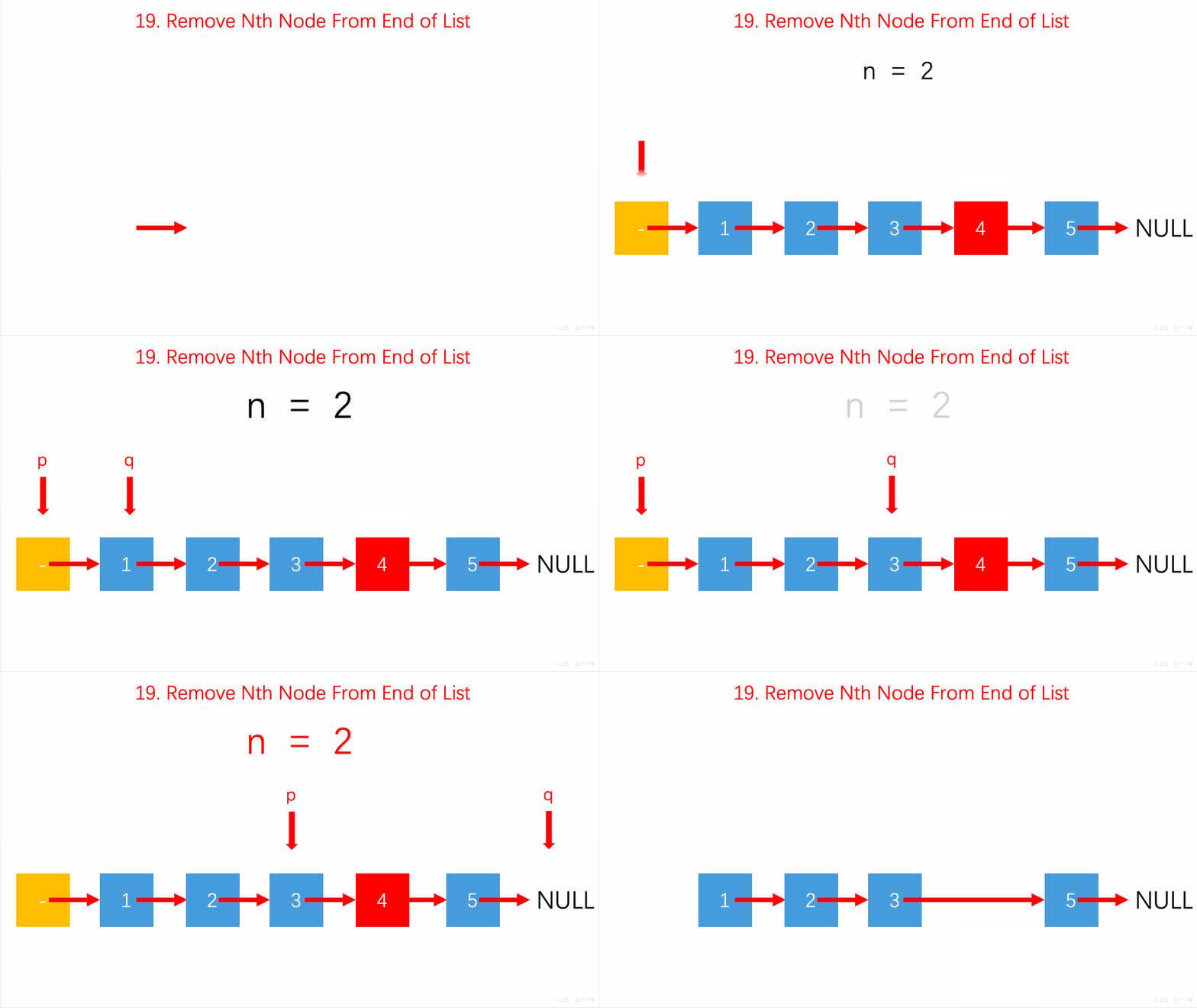
<p>利用哑结点和双指针，让start指针先移动n个位置， 然后两个指针再一起移动，当start移动的已经为空了说明已经到了要删除节点的前一个节点， 让end指针指向它的下下一个节点即可完成删除</p>
<figure data-type="image" tabindex="1"><img src="https://pic.leetcode-cn.com/cc43daa8cbb755373ce4c5cd10c44066dc770a34a6d2913a52f8047cbf5e6e56-file_1559548337458" alt="" loading="lazy"></figure>
<pre><code class="language-java">public ListNode removeNthFromEnd(ListNode head, int n) {
        ListNode dh = new ListNode(0);
        dh.next = head;
        ListNode start = dh;
        ListNode end = dh;

        for (int i = 1; i &lt;= n + 1; i++) {
            start = start.next;
        }
        while (start != null) {
            start = start.next;
            end = end.next;
        }
        end.next = end.next.next;
        return dh.next;
    }
</code></pre>
]]></content>
    </entry>
    <entry>
        <title type="html"><![CDATA[LeetCodeQ2:两数相加]]></title>
        <id>http://icyfe.cn/post/leetcodeq2liang-shu-xiang-jia-lian-biao/</id>
        <link href="http://icyfe.cn/post/leetcodeq2liang-shu-xiang-jia-lian-biao/">
        </link>
        <updated>2020-06-22T04:19:18.000Z</updated>
        <content type="html"><![CDATA[<h2 id="题目给出两个-非空-的链表用来表示两个非负的整数-其中它们各自的位数是按照-逆序-的方式存储的并且它们的每个节点只能存储-一位-数字">题目:给出两个 非空 的链表用来表示两个非负的整数。其中，它们各自的位数是按照 逆序 的方式存储的，并且它们的每个节点只能存储 一位 数字。</h2>
<p>如果，我们将这两个数相加起来，则会返回一个新的链表来表示它们的和。<br>
您可以假设除了数字 0 之外，这两个数都不会以 0 开头。<br>
示例：<br>
输入：(2 -&gt; 4 -&gt; 3) + (5 -&gt; 6 -&gt; 4)<br>
输出：7 -&gt; 0 -&gt; 8<br>
原因：342 + 465 = 807</p>
<h2 id="题解">题解：</h2>
<p>利用哑结点，遍历两个链表的值使其一 一相加，用carry记录当前的值是否大于10； 大于10下一位如果有值不为空则+1，如果下一位值为空说明已经遍历完成了，则在末尾创建一个新的节点值为 carry值，当前的相加的值为 sum %10。</p>
<pre><code class="language-java">public ListNode twoSum(ListNode l1, ListNode l2) {
        ListNode dh = new ListNode(0);
        ListNode a = l1, b = l2, pre = dh;
        int carry = 0;
        while (a != null || b != null) {
            int x = (a != null) ? a.val : 0;
            int y = (b != null) ? b.val : 0;
            int sum = carry + x + y;

            carry = sum / 10;
            pre.next = new ListNode(sum % 10);
            pre = pre.next;
            if (a != null)
                a = a.next;
            if (b != null)
                b = b.next;

        }
        // 遍历完成，carry仍然大于0则在末尾创建一个新的节点值为当前的carry值
        if (carry &gt; 0) {
            pre.next = new ListNode(carry);
        }
        return dh.next;
    }
</code></pre>
]]></content>
    </entry>
    <entry>
        <title type="html"><![CDATA[LeetCodeQ1：两数之和]]></title>
        <id>http://icyfe.cn/post/leetcodeq1liang-shu-zhi-he/</id>
        <link href="http://icyfe.cn/post/leetcodeq1liang-shu-zhi-he/">
        </link>
        <updated>2020-06-20T10:00:15.000Z</updated>
        <content type="html"><![CDATA[<h2 id="题目给定一个整数数组-nums-和一个目标值-target请你在该数组中找出和为目标值的那-两个-整数并返回他们的数组下标">题目:给定一个整数数组 nums 和一个目标值 target，请你在该数组中找出和为目标值的那 两个 整数，并返回他们的数组下标。</h2>
<p>你可以假设每种输入只会对应一个答案。但是，数组中同一个元素不能使用两遍。<br>
示例:<br>
给定 nums = [2, 7, 11, 15], target = 9<br>
因为 nums[0] + nums[1] = 2 + 7 = 9<br>
所以返回 [0, 1]</p>
<h2 id="解法一">解法一</h2>
<p>暴力解法两遍遍历找出两数相加等于target的两个val的下标值</p>
<pre><code class="language-java">public int[] twoSum(int[] nums, int target) {
        int[] result = new int[2];
        for (int i = 0; i &lt; nums.length; i++) {
            for (int j = i + 1; j &lt; nums.length; j++) {
                if (nums[i] + nums[j] == target) {
                    result[0] = i;
                    result[1] = j;
                    return result;
                }
            }
        }
        return null;
}
</code></pre>
<h2 id="解法二">解法二</h2>
<p>一遍遍历，利用hash存储每个值，用target 减去当前遍历的值得到的结果是否 存在hash里，有的话返回两个值的下标</p>
<pre><code class="language-java"> public int[] twoSum(int[] a, int target) {
        Map&lt;Integer, Integer&gt; map = new HashMap&lt;&gt;();
        for (int i = 0; i &lt; a.length; i++) {
            if (map.containsKey(target - a[i])) {
                return new int[] { map.get(target - a[i]), i };
            }
            map.put(a[i], i);
        }
        return null;
 }
</code></pre>
]]></content>
    </entry>
    <entry>
        <title type="html"><![CDATA[深入理解Css权重值]]></title>
        <id>http://icyfe.cn/post/shen-ru-li-jie-css-quan-chong-zhi/</id>
        <link href="http://icyfe.cn/post/shen-ru-li-jie-css-quan-chong-zhi/">
        </link>
        <updated>2020-05-12T14:36:35.000Z</updated>
        <content type="html"><![CDATA[<h1 id="css-权重值">Css 权重值？</h1>
<p>在日常我们写 css 样式的时候或多或少都遇到过自己写的样式不生效的时候，一般都不会去探究背后的原因直接一股脑的！important 完事，但这样是非常不好的，但有的时候加了 important 也无法生效样式（当然我们还是遵循能不写 Important 就尽量不写），这是为什么呢！在 css 写样式中有个重要的权重问题！</p>
<h2 id="什么是权重">什么是权重？</h2>
<p>每个 css 规则都有自己相应的权重值，权重值越大的规则生效，主要有 5 种</p>
<ol>
<li>行内样式 权重值 1000</li>
<li>id 选择器 权重值 100</li>
<li>类选择起，属性和伪类(:hover,actived) 权重值 10 4.元素，伪元素 (::before,::after) 权重值 1<br>
5.!important 最大，（但也遵从权重计算规则下面会提到）<br>
我们写的 css 规则就按照以上权重值进行累加，例如以下栗子：</li>
</ol>
<pre><code class="language-css">&lt;div style=&quot;.....&quot;&gt;&lt;/div&gt; =&gt;1000
#id{} =&gt;100
.class{}=&gt;10
body{} =&gt;1
p{}=&gt;1
</code></pre>
<p>当写 css 规则时会按照值进行累加，值越大权重越大</p>
<pre><code class="language-css">body #id {} =&gt;元素1 id选择器100 = 101
#id .class{} =&gt;id选择器100类选择器 = 110
#id .class p{} =&gt; id选择器100  类选择器10 元素标签1 = 111
</code></pre>
<h2 id="主要规则">主要规则</h2>
<p><strong>无论多少个同级权重累加都不会超过高等级权重值</strong></p>
<pre><code class="language-css">.class .class .Nclass {
}
&lt; #id {
}
</code></pre>
<p><strong>相同权重值作用于同一个元素时权重值大的生效</strong></p>
<pre><code class="language-css">.test1 .test2{background:red} =&gt;20
.tetst1 .test2 p{background:black} =&gt;21
</code></pre>
<p>假设以上两条都作用于同一个元素，下面权重值高的会生效<br>
有时候!important 加了也没生效是为什么呢？因为它也遵循权重大小规则例如：</p>
<pre><code class="language-css">.test1 .test2{background:red!important} =&gt;20
.tetst1 .test2 p{background:black!important} =&gt;21
</code></pre>
<p>上面都加了 important 但还是权重值更大的会生效<br>
<strong>离元素标签越近的生效</strong><br>
在一个单独的 css 文件写如下样式</p>
<pre><code class="language-css">.nav-bar {
  background: red;
}
</code></pre>
<p>在 html 的 style 中写</p>
<pre><code class="language-html">&lt;head&gt;
  &lt;style&gt;
    .nav-bar {
      background: black;
    }
  &lt;/style&gt;
&lt;/head&gt;
</code></pre>
<p>以上栗子中虽然都一样但是下面的 css 会生效<br>
<a href="https://www.adobe.com/devnet/archive/dreamweaver/articles/css_specificity_02.html">详细参阅【Understanding Specificity】 </a></p>
<p><strong>相同的权重后面的会覆盖前面的</strong></p>
<pre><code class="language-css">p {
  background: red;
}
p {
  background: black;
}
</code></pre>
<h2 id="最后">最后</h2>
<p><strong>不要用!important</strong><br>
永远都不要使用“!important”：“如果你遇到了权重问题，第一个解决方法肯定是去掉“!important”，“!important”会覆盖所有的样式规则，但“!important”根本没有结构与上下文可言，所以很 容易找不到样式失效的原因</p>
<p>本文参考<a href="https://www.w3cplus.com/css/css-specificity-things-you-should-know.html">你应该知道的 css 权重问题</a></p>
]]></content>
    </entry>
    <entry>
        <title type="html"><![CDATA[ less 全局换肤方案]]></title>
        <id>http://icyfe.cn/post/less-quan-ju-huan-fu-fang-an/</id>
        <link href="http://icyfe.cn/post/less-quan-ju-huan-fu-fang-an/">
        </link>
        <updated>2020-03-19T08:18:58.000Z</updated>
        <content type="html"><![CDATA[<h2 id="方案基于-antd-ui">方案基于 antd UI</h2>
<h2 id="新建-globalless">新建 global.less</h2>
<p>新建 global.less 在资源文件夹 aseets/style 下 具体代码如下 虽然这个没什么用但是必须得创建</p>
<pre><code class="language-js">@primary-color: &quot;#f52533&quot; !important;

</code></pre>
<h2 id="新建-varsless">新建 vars.less</h2>
<p>新建 vars.less 在资源文件夹 aseets/style(根据自己项目情况而定)</p>
<pre><code class="language-js">@import &quot;~antd/lib/style/themes/default.less&quot;; //引入antd的变量文件，实现变量的覆盖
@primary-color: #1da57a;
@link-color: #1da57a;
@btn-primary-bg: #1da57a;
:root {
 --primary-color-0: @primary-color; //color.less中加入css原生变量：--PC
}

</code></pre>
<h2 id="新建-themcolorjs">新建 themColor.js</h2>
<p>在项目根目录下 新建 themColor.js 用于动态更改全局主题色</p>
<pre><code class="language-js">const path = require(&quot;path&quot;);
const { generateTheme, getLessVars } = require(&quot;antd-theme-generator&quot;);

const options = {
  stylesDir: path.join(__dirname, &quot;./src/assets/styles&quot;), //对应具体位置
  antDir: path.join(__dirname, &quot;./node_modules/antd&quot;), //对应具体位置
  varFile: path.join(__dirname, &quot;./src/assets/styles/vars.less&quot;), //对应具体位置
  mainLessFile: path.join(__dirname, &quot;./src/assets/styles/global.less&quot;), //对应具体位置
  themeVariables: [
    &quot;@primary-color&quot;,
    &quot;@secondary-color&quot;,
    &quot;@text-color&quot;,
    &quot;@text-color-secondary&quot;,
    &quot;@heading-color&quot;,
    &quot;@layout-body-background&quot;,
    &quot;@btn-primary-bg&quot;,
    &quot;@layout-header-background&quot;
  ],
  indexFileName: &quot;index.html&quot;,
  outputFilePath: path.join(__dirname, &quot;./public/color.less&quot;) //页面引入的主题变量文件
};

generateTheme(options)
  .then(less =&gt; {
    console.log(&quot;Theme generated successfully&quot;);
  })
  .catch(error =&gt; {
    console.log(&quot;Error&quot;, error);
  });
</code></pre>
<h3 id="在模板-indexhtml-就是我们的组件要挂载的-html-中加入以下配置">在模板 index.html (就是我们的组件要挂载的 html) 中加入以下配置</h3>
<pre><code class="language-html">&lt;!DOCTYPE html&gt;
&lt;html lang=&quot;en&quot;&gt;
  &lt;head&gt;
    &lt;meta charset=&quot;utf-8&quot; /&gt;
    &lt;link rel=&quot;icon&quot; href=&quot;%PUBLIC_URL%/favicon.ico&quot; /&gt;
    &lt;meta name=&quot;viewport&quot; content=&quot;width=device-width, initial-scale=1&quot; /&gt;
    &lt;meta name=&quot;theme-color&quot; content=&quot;#000000&quot; /&gt;
    &lt;meta
      name=&quot;description&quot;
      content=&quot;Web site created using create-react-app&quot;
    /&gt;
    &lt;link rel=&quot;apple-touch-icon&quot; href=&quot;logo192.png&quot; /&gt;

    &lt;!--
      manifest.json provides metadata used when your web app is installed on a
      user's mobile device or desktop. See https://developers.google.com/web/fundamentals/web-app-manifest/
    --&gt;
    &lt;link rel=&quot;manifest&quot; href=&quot;%PUBLIC_URL%/manifest.json&quot; /&gt;
    &lt;!--
      Notice the use of %PUBLIC_URL% in the tags above.
      It will be replaced with the URL of the `public` folder during the build.
      Only files inside the `public` folder can be referenced from the HTML.

      Unlike &quot;/favicon.ico&quot; or &quot;favicon.ico&quot;, &quot;%PUBLIC_URL%/favicon.ico&quot; will
      work correctly both with client-side routing and a non-root public URL.
      Learn how to configure a non-root public URL by running `npm run build`.
    --&gt;
    &lt;title&gt;React App&lt;/title&gt;
  &lt;/head&gt;

  &lt;body&gt;
    &lt;!-- 重点是这里 start --&gt;
    &lt;link
      rel=&quot;stylesheet/less&quot;
      type=&quot;text/css&quot;
      href=&quot;%PUBLIC_URL%/color.less&quot;
      rel=&quot;external nofollow&quot;
    /&gt;
    &lt;script&gt;
      window.less = {
        async: false,
        env: &quot;production&quot;
      };
    &lt;/script&gt;
    &lt;script
      type=&quot;text/javascript&quot;
      src=&quot;https://cdnjs.cloudflare.com/ajax/libs/less.js/2.7.2/less.min.js&quot;
    &gt;&lt;/script&gt;
    &lt;!-- 重点是这里 end --&gt;
    &lt;noscript&gt;You need to enable JavaScript to run this app.&lt;/noscript&gt;
    &lt;div id=&quot;root&quot;&gt;&lt;/div&gt;
    &lt;!--
      This HTML file is a template.
      If you open it directly in the browser, you will see an empty page.

      You can add webfonts, meta tags, or analytics to this file.
      The build step will place the bundled scripts into the &lt;body&gt; tag.

      To begin the development, run `npm start` or `yarn start`.
      To create a production bundle, use `npm run build` or `yarn build`.
    --&gt;
  &lt;/body&gt;
&lt;/html&gt;
</code></pre>
<h3 id="最后修改-packgejson-文件">最后修改 packge.json 文件</h3>
<p>在 scripts 中加入以下代码</p>
<pre><code class="language-js">  &quot;scripts&quot;: {
    &quot;start&quot;: &quot;node themeColor &amp;&amp; node scripts/start.js&quot;,
    &quot;build&quot;: &quot;node themeColor &amp;&amp; node scripts/build.js&quot;,
    &quot;test&quot;: &quot;node scripts/test.js&quot;
  },
</code></pre>
<h2 id="如何更改">如何更改</h2>
<p>在需要动态更改的地方 使用以下代码就可以了</p>
<pre><code class="language-js">window.less
  .modifyVars({
    &quot;@primary-color&quot;: &quot;#FFB6C1&quot;,
    &quot;@link-color&quot;: &quot;#FFB6C1&quot;,
    &quot;@btn-primary-bg&quot;: &quot;#FFB6C1&quot;
  })
  .then(() =&gt; {})
  .catch(error =&gt; {
    // message.error(`Failed to update theme`);
  });
</code></pre>
]]></content>
    </entry>
    <entry>
        <title type="html"><![CDATA[Javascript this 指向问题]]></title>
        <id>http://icyfe.cn/post/javascript-this-zhi-xiang-wen-ti/</id>
        <link href="http://icyfe.cn/post/javascript-this-zhi-xiang-wen-ti/">
        </link>
        <updated>2019-10-03T08:06:55.000Z</updated>
        <content type="html"><![CDATA[<p>关于 this 指向肯定遇到过许许多多的奇怪问题，这都是因为没弄清楚它的指向导致一些调用的错误，下面总结先 this 的指向。</p>
<h2 id="1谁调用了它this-就指向谁当是全局调用且为非严格模式时-this-指全局在浏览器环境下指向-window否则是-undefined"><strong>1.谁调用了它，this 就指向谁，当是全局调用且为非严格模式时 this 指全局(在浏览器环境下指向 window)，否则是 undefined</strong></h2>
<p>举个栗子<br>
非严格模式</p>
<pre><code class="language-js">var value = 'global scope';
function a() {
  console.log(this.value);
}
a(); // global scope
</code></pre>
<p>严格模式</p>
<pre><code class="language-js">'use strict';
var value = 'global scope';
function a() {
  console.log(this.value);
}
a(); // undefined
</code></pre>
<p>在浏览器中全局的 this 默认是 window， 因此 a()在全局中被调用相当于是 window.a，谁调用它 this 就指向谁，因此这里打印出全局变量的'global scope'<br>
在看一个栗子：</p>
<pre><code class="language-js">var value = 'global scope';
var o = {
  value: 'local scope',
  a: function() {
    console.log(this.value);
  }
};

o.a(); //local scope
</code></pre>
<p>这里通过创建一个 o 实例对象，通过 o 调用 this 的指向就指向 o。</p>
<h2 id="2call-apply-bind-改变this指向"><code>2.call, apply, bind 改变this指向</code></h2>
<p>在 js 中有三种方式可以显示的改变 this 的指向，call 和 apply 除了传参不一样其本质是一样的，call 和 apply 第一个参数都是要传入将要指向的 this, call 后面可接多个参数，apply 则是第二个参数接收一个参数的集合，也就是数组。</p>
<pre><code class="language-js">fn.call(this, arg1, ag2, ag3);
fn.apply(this, [...arg]);
</code></pre>
<p>bind 的本质是封装了 apply 它返回的一个函数。<br>
来看几个栗子:</p>
<pre><code class="language-js">var value = 'global scope';
function b() {
  console.log(this.value);
}
var o = {
  value: 'local scope',
  a: function() {
    console.log(this.value);
  }
};

b.call(o); //local scope
b.apply(o); //local scope
let c = b.bind(o);
c(); //local scope
</code></pre>
<p>上面几个栗子都是改变了 this 的指向，原本在非严格模式下指向全局的 this 应该输出'global scope'，改变 this 指向后指向了传入的 o 对象因此打印出'local scope'<br>
call 和 apply 的原理其实是在传入的对象增加要执行的函数，从而改变 this 的指向，执行完后在删除函数，这个后面会有一章节来仿写 call,apply 和 bind 函数。</p>
<h2 id="3new-关键字">3.new 关键字</h2>
<p>通过 new 关键字调用函数会以构造函数的形式调用会发生以下步骤 1.创建一个对象 2.将对象的实例原型指向构造函数的原型<br>
<strong>3.将对象的 this 绑定到构造函数并创建一系列属性</strong> 4.返回这个对象<br>
因此我们可以 new 关键字调用的函数也会改变 this 的指向，它指向创建出来的实例对象<br>
举个栗子：</p>
<pre><code class="language-js">var value = 'global scope';
function A() {
  this.value = 'local scope';
  this.sayValue = function() {
    console.log(this.value);
  };
}

let b = new A();
b.sayValue();
</code></pre>
<p>通过 new 内部发生的过程我们就可以知道上面的栗子将 this 指向了新创建出来的实例 b 因此打印 value 时候就打印出'local scope'</p>
<h2 id="4-箭头函数的-this">4、箭头函数的 this</h2>
<p>在 ES6 中新增了箭头函数用法，它本身没有绑定 this，它的 this 指向是离的它最近的一个普通函数所绑定的 this，在 ES5 之前我们在一些匿名函数为了防止 this 指向丢失我们可能会这样绑定 this</p>
<pre><code class="language-js">function a() {
  let self = this;
  this.value = 'Hi!';
  setTimeout(function() {
    console.log(self.value);
  }, 0);
}
</code></pre>
<p>在 ES6 中这样就可以了</p>
<pre><code class="language-js">function a() {
  this.value = 'Hi!';
  setTimeout(() =&gt; {
    console.log(this.value);
  }, 0);
}
</code></pre>
<h2 id="总结">总结</h2>
<p><code>只要记住一点。在箭头函数中的this的指向永远是离它最近的一个普通函数所绑定的this,如上栗子离匿名函数最近的普通函数是 a函数， 当a被谁调用时 this就指向谁</code></p>
]]></content>
    </entry>
    <entry>
        <title type="html"><![CDATA[手写简单版符合 PromiseA+规范的 Promise]]></title>
        <id>http://icyfe.cn/post/shou-xie-jian-dan-ban-fu-he-promiseagui-fan-de-promise/</id>
        <link href="http://icyfe.cn/post/shou-xie-jian-dan-ban-fu-he-promiseagui-fan-de-promise/">
        </link>
        <updated>2019-10-01T02:05:52.000Z</updated>
        <content type="html"><![CDATA[<p>今天手写一个符合 promiseA+规范的 promise，这个知识点可能快被写烂了吧，但还是作为学习比较加深自己对 Promise 的理解。<br>
先来了解 Promise 是什么，promise 的出现为了解决什么问题，最后我们根据 promiseA+自己手写实现一个 promise</p>
<h2 id="一-promise-是什么">一、Promise 是什么？</h2>
<p>贴一段 MDN 的介绍<br>
<code>Promise 对象用于表示一个异步操作的最终状态（完成或失败），以及其返回的值..... Promise 对象是一个代理对象（代理一个值），被代理的值在Promise对象创建时可能是未知的。它允许你为异步操作的成功和失败分别绑定相应的处理方法（handlers）。 这让异步方法可以像同步方法那样返回值，但并不是立即返回最终执行结果，而是一个能代表未来出现的结果的promise对象。</code><br>
通俗点来说就是解决异步操作问题的一个类。<br>
<a href="url">https://developer.mozilla.org/zh-CN/docs/Web/JavaScript/Reference/Global_Objects/Promise</a></p>
<h2 id="二-promise-的出现为了解决什么问题">二、Promise 的出现为了解决什么问题？</h2>
<p>相信接触过异步操作的同学都经历过回调地狱，一个异步接着一个异步如下所示</p>
<pre><code class="language-js">asyncFunc1(opt, (...args1) =&gt; {
  asyncFunc2(opt, (...args2) =&gt; {
    asyncFunc3(opt, (...args3) =&gt; {
      asyncFunc4(opt, (...args4) =&gt; {
        // some operation
      });
    });
  });
});
</code></pre>
<p>这样的代码不仅难以维护，可读性也差简直痛苦，Promise 的出现通过链式调用可以很大程度上解决回调地狱的问题，通过 Promise 可以写成这样</p>
<pre><code>asyncFunc1('...“).then(res=&gt; {
    return asyncFunc2(res);
}).then(res =&gt; {
    return asyncFunc3(res);
}).then(res =&gt; {
   return asyncFunc4(res);
}).then(res =&gt;{
console.log(res)
})
</code></pre>
<p>这样的每一次的 then 的返回值都可以作为下一个的异步操作的参数，这样回调地狱的问题就轻易解决了。<br>
本文对 Promise 的用法不多做介绍跟多的用法可看阮一峰老师的 es6 入门<a href="url">http://es6.ruanyifeng.com/</a></p>
<h2 id="三-手写一个符合-promisea规范的-promise">三、手写一个符合 PromiseA+规范的 Promise</h2>
<p>开始写之前贴上 PromiseA+规范的链接 <a href="url">http://www.ituring.com.cn/article/66566</a><br>
<strong>1、首先 Promise 有三种状态等待(pending),<br>
成功态(fulfilled,规范中称为执行态我认为解释为成功态或者完成态更好理解),<br>
失败(rejected),并且只能为以上三种状态的其实一种，等待态可改变为成功态或者失败态，成功态有成功的值不能改变为其他任何状态，失败态有失败的值不能改变为其他任何状态。<br>
2、Promise 接受一个函数作为参数文档中称为‘executor’翻译过来就是执行者说明在构造函数一调用的时候就被执行，这个 executor 函数有两个参数分别是 resolve,reject，当 executor 函数中的 resovle 函数被调用时状态改变为成功态(fulfiiled)，reject 函数被调用时状态就改变为失败态(rejected),当 executor 函数执行出错时就直接调用 reject 方法，因此我们要捕获 executor 函数执行时的异常。</strong></p>
<p>根据这两条我们写初始的代码</p>
<pre><code class="language-js">class Promise {
  constructor(executor) {
    //状态
    this.status = 'pending';
    //失败的值
    this.reason = null;
    //成功的值
    this.value = null;

    let resolve = value =&gt; {
      if (this.status == 'pending') {
        this.status = 'fulfilled';
        this.value = value;
      }
    };
    let reject = reason =&gt; {
      if (this.status == 'pending') {
        this.status = 'rejected';
        this.reason = reason;
      }
    };
    //当调用构造函数时就调用executor函数并捕获异常
    try {
      executor(resolve, reject);
    } catch (error) {
      reject(error);
    }
  }
}
</code></pre>
<p><strong>3、promiseA+规定必须要有一个 then 方法可以访问其成功或失败时候的返回值，then 方法接受两个参数分别为 onFulfilled 和 onRejectd，并且还规定了当两个参数不是函数时其值被忽略</strong><br>
<strong>4、当 onFulfilled 和 onRejected 是函数时，onFulfilled 函数只能被调用一次，在 promise 执行成功结束后，并将 promise 的返回值作为终值，onReject 函数只能被调用一次，当 promise 被拒绝执行后其必须被调用，其第一个参数为 promise 的据因。</strong></p>
<p>根据这两条我们来写 then 的初始方法</p>
<pre><code class="language-js">//then方法接受两个参数onFulfilled,onRejected
 then(onFulfilled, onRejected) {
     //如果非函数就直接返回值
     onFulfilled = typeof onFulfilled == 'function' ? onFulfilled : v =&gt; v
     // 错误的就直接抛错不在执行
     onRejected = typeof onRejected == 'function' ? onRejected : err =&gt; { throw err }
     //成功后立即执行,并将其结果作为参数
     if (this.status == 'fulfilled') {
         onFulfilled(this.value)
     }
     // 失败后立即执行,并将其拒因作为参数
     if (this.status == 'rejected') {
         onRejected(this.reason)
     }
 }
}
</code></pre>
<p><strong>5、then 方法可以被同一个 promise 多次调用，如下所示<br>
let p = new Promise()<br>
p.then()<br>
p.then()<br>
当 promise 成功执行时，所有 onFulfilled 需按照其注册顺序依次回调<br>
当 promise 被拒绝执行时，所有的 onRejected 需按照其注册顺序依次回调</strong></p>
<p>以上代码只能解决同步问题，所以当我们异步执行的时候我们要有两个队列(当多次调用的时候)在等待状态的时候分别存放成功和失败时候的回调，并在状态改变的时候依次取出来执行</p>
<p>在构造函数添加代码</p>
<pre><code class="language-js">//成功回调存放
this.resolvedCallbacks = [];
//失败回调存放
this.rejectedCallbacks = [];
let resolve = value =&gt; {
  if (this.status == 'pending') {
    this.status = 'fulfilled';
    this.value = value;
    //依次取出回调执行
    this.resolvedCallbacks.map(cb =&gt; cb());
  }
};
let reject = reason =&gt; {
  if (this.status == 'pending') {
    this.status = 'rejected';
    this.reason = reason;
    //依次取出回调执行
    this.rejectedCallbacks.map(cb =&gt; cb());
  }
};
</code></pre>
<p>在 then 函数添加 pending 状态判断</p>
<pre><code class="language-js">//当时等待状态时候存放失败或成功的回调
if (this.status == 'pending') {
  this.rejectedCallbacks.push(() =&gt; {
    onRejected(this.reason);
  });
  this.resolvedCallbacks.push(() =&gt; {
    onFulfilled(this.value);
  });
}
</code></pre>
<p><strong>6、规范规定 then 函数必须返回一个 promise 对象，因为我们知道规范中的 promise 是和链式调用的如 p.then().then()这样形式的调用用来解决回调地狱的问题，所以我们要返回一个 promise 对象可供链式调用，规范中称它为 promise2 <code>promise2 = promise1.then(onFulfilled, onRejected);</code><br>
7、then 会有个返回值规范中称它为 x 并作为下一个 promise 的参数进行传递，<br>
这个 x 值就是 onFulfilled 或者 onRejected 执行后的返回值，<br>
并且这个 x 值需要做判断，判断的函数为 resolvePromise，<br>
如果 x 是普通值就直接作为 promise2 的终值，如果 x 是 promise 就取得 x 的最终状态作为 promise2 的结果。 resolvePromise 有四个参数 promise2,x,resolve,reject,其中 resolve 和 reject 为 promise2 的。</strong></p>
<p>根据这两条得出以下代码</p>
<pre><code class="language-js"> //then方法接受两个参数onFulfilled,onRejected
    then(onFulfilled, onRejected) {
        // 返回promise对象
        let promise2 = new Promise((resolve, reject) =&gt; {
            //如果非函数就直接返回值
            onFulfilled = typeof onFulfilled == 'function' ? onFulfilled : v =&gt; v
            // 错误的就直接抛错不在执行
            onRejected = typeof onRejected == 'function' ? onRejected : err =&gt; { throw err }
            //成功后立即执行,并将其结果作为参数
            if (this.status == 'fulfilled') {
                //x 为onFufilled的值
                let x = onFulfilled(this.value)
                // 判断x的函数
                resolvePromise(promise2, x, resolve, reject)
            }
            // 失败后立即执行,并将其拒因作为参数
            if (this.status == 'rejected') {
                onRejected(this.reason)
                resolvePromise(promise2, x, resolve, reject)
            }
            //当时等待状态时候存放失败或成功的回调
            if (this.status == 'pending') {
                this.rejectedCallbacks.push(() =&gt; {
                    let x = onRejected(this.reason)
                    resolvePromise(promise2, x, resolve, reject)
                })
                this.resolvedCallbacks.push(() =&gt; {
                    onFulfilled(this.value)
                    resolvePromise(promise2, x, resolve, reject)
                })
            }
        })
        return promise2
    }
</code></pre>
<p><strong>8、resolvePromise 实现的功能主要就是判断 x 的值规范规定了以下几点 1.如果 x 指向同一对象就抛错，防止相互引用的情况出现，并且 x 不为空， 2.如果 x 是普通值就直接 resolve 3.如果 x 是函数或者对象(包括 promise)<br>
.定义 then 并使得 then = x.then()----promiseA+原文‘Otherwise, if x is an object or function,Let then be x.then’，并捕获取 then 过程的异常如果出错就直接 reject()<br>
.如果 then 是函数就调用 call 执行 this 为当前的 x,后面分别是成功和失败的回调，如果 then 非函数就直接 resolve<br>
.并且成功和失败只能被调用一次，因此我们要定义一个 called 来标记是否已经执行过成功或失败的回调，如果成功的返回值仍然是 Promise 就递归调用 resovlePromise 函数</strong></p>
<p>根据这条我们来写 resovlePromise 函数</p>
<pre><code class="language-js">function resolvePromise(promise2, x, resolve, reject) {
  if (x == promise2) {
    return new TypeError('Error');
  }
  let called = false; //定义标志，防止重复调用
  // x 不能为空，且为对象或者函数时，为普通值就直接resovle
  if (x != null &amp;&amp; (typeof x == 'object' || typeof x == 'function')) {
    //定义then 并捕获异常
    try {
      let then = x.then();
      //如果then为函数，默认为promise对象就继续递归解析
      if (typeof then == 'function') {
        then.call(
          x,
          y =&gt; {
            //只允许被调用一次
            if (called) return;
            called = true;
            resolvePromise(promise2, y, resolve, reject);
          },
          err =&gt; {
            if (called) return;
            called = true;
            reject(err);
          }
        );
      } else {
        if (called) return;
        called = true;
        resolve(x);
      }
    } catch (error) {
      if (called) return;
      called = true;
      reject(error);
    }
  } else {
    resolve(x);
  }
}
</code></pre>
<p>好了这样我们就完成了一个符合规范的 Promise</p>
<p>附上 all,race,resolve,reject，catch,finlly 代码</p>
<pre><code class="language-js">Promise.resolve = function(v) {
  return new Promise((resolve, reject) =&gt; {
    resolve(v);
  });
};
Promise.reject = function(err) {
  return new Promise((resolve, reject) =&gt; {
    resolve(err);
  });
};
Promise.race = function(promises) {
  return new Promise((resolve, reject) =&gt; {
    for (let i = 0; i &lt; promises.length; i++) {
      promises[i].then(resolve, reject);
    }
  });
};
Promise.all = function(promises) {
  let arr = [];
  let index = 0;
  return new Promise((resolve, reject) =&gt; {
    for (let i = 0; i &lt; promises.length; i++) {
      promises[i].then(data =&gt; {
        addResult(i, data);
      }, reject);
    }
    function addResult(i, data) {
      if (index == arr.length) {
        resolve(arr);
      }
      index++;
      arr[i].push(data);
    }
  });
};
Promise.catch = function(errFn) {
  return this.then(null, errFn);
};
Promise.finally = function(fn) {
  this.then(
    () =&gt; {
      fn();
    },
    () =&gt; {
      fn();
    }
  );
  return this;
};
</code></pre>
<p>完整代码</p>
<pre><code class="language-js">
class Promise {
    constructor(executor) {
        //状态
        this.status = 'pending'
        //失败的值
        this.reason = null
        //成功的值
        this.value = null
        //成功回调存放
        this.resolvedCallbacks = []
        //失败回调存放
        this.rejectedCallbacks = []
        let resolve = (value) =&gt; {
            if (this.status == 'pending') {
                this.status = 'fulfilled'
                this.value = value
                //依次取出回调执行
                this.resolvedCallbacks.map(cb =&gt; cb())
            }
        }
        let reject = (reason) =&gt; {
            if (this.status == 'pending') {
                this.status = 'rejected'
                this.reason = reason
                //依次取出回调执行
                this.rejectedCallbacks.map(cb =&gt; cb())
            }
        }
        //当调用构造函数时就调用executor函数并捕获异常
        try {
            executor(resolve, reject)
        } catch (error) {
            reject(error)
        }
    }
    //then方法接受两个参数onFulfilled,onRejected
    then(onFulfilled, onRejected) {
        // 返回promise对象
        let promise2 = new Promise((resolve, reject) =&gt; {
            //如果非函数就直接返回值
            onFulfilled = typeof onFulfilled == 'function' ? onFulfilled : v =&gt; v
            // 错误的就直接抛错不在执行
            onRejected = typeof onRejected == 'function' ? onRejected : err =&gt; { throw err }
            //成功后立即执行,并将其结果作为参数
            if (this.status == 'fulfilled') {
                //x 为onFufilled的值
                let x = onFulfilled(this.value)
                // 判断x的函数
                resolvePromise(promise2, x, resolve, reject)
            }
            // 失败后立即执行,并将其拒因作为参数
            if (this.status == 'rejected') {
                onRejected(this.reason)
                resolvePromise(promise2, x, resolve, reject)
            }
            //当时等待状态时候存放失败或成功的回调
            if (this.status == 'pending') {
                this.rejectedCallbacks.push(() =&gt; {
                    let x = onRejected(this.reason)
                    resolvePromise(promise2, x, resolve, reject)
                })
                this.resolvedCallbacks.push(() =&gt; {
                    onFulfilled(this.value)
                    resolvePromise(promise2, x, resolve, reject)
                })
            }
        })
        return promise2
    }
}
function resolvePromise(promise2, x, resolve, reject) {
    if (x == promise2) {
        return new TypeError('Error')
    }
    let called = false //定义标志，防止重复调用
    // x 不能为空，且为对象或者函数时，为普通值就直接resovle
    if (x != null &amp;&amp; (typeof x == 'object' || typeof x == 'function')) {
        //定义then 并捕获异常
        try {
            let then = x.then()
            //如果then为函数，默认为promise对象就继续递归解析
            if (typeof then == 'function') {
                then.call(x, y =&gt; {
                    //只允许被调用一次
                    if (called) return
                    called = true
                    resolvePromise(promise2, y, resolve, reject)
                }, err =&gt; {
                    if (called) return
                    called = true
                    reject(err)
                })
            } else {
                if (called) return
                called = true
                resolve(x)
            }
        } catch (error) {
            if (called) return
            called = true
            reject(error)
        }
    } else {
        resolve(x)
    }
}
Promise.resolve = function (v) {
    return new Promise((resolve, reject) =&gt; {
        resolve(v)
    })
}
Promise.reject = function (err) {
    return new Promise((resolve, reject) =&gt; {
        reject(err)
    })
}
Promise.race = function (promises) {
    return new Promise((resolve, reject) =&gt; {
        for (let i = 0; i &lt; promises.length; i++) {
            Promise.resolve(promises[i]).then((resolve,reject));
        }
    })
}
Promise.all = function (promises) {
    let arr = []
    let index = 0;
   let resultarr =[];
   let count = 0;
   len asynclen = promises.length
    return new Promise((resolve, reject) =&gt; {
        for (let i = 0; i &lt;asynclen ; i++) {
            promises[i].then((value) =&gt; {
                count++;
                resultarr.push(value);
               if(count==asynclen ){
                      resolve(resultarr)
                 }
            }, reject)
        }
    })
}
Promise.catch = function (errFn) {
    return this.then(null, errFn);
}
Promise.finally = function (fn) {
    this.then(() =&gt; {
        fn();
    }, () =&gt; {
        fn();
    });
    return this;
}

</code></pre>
]]></content>
    </entry>
    <entry>
        <title type="html"><![CDATA[实现一个简单的 MVVM]]></title>
        <id>http://icyfe.cn/post/shi-xian-yi-ge-jian-dan-de-mvvm/</id>
        <link href="http://icyfe.cn/post/shi-xian-yi-ge-jian-dan-de-mvvm/">
        </link>
        <updated>2019-09-17T13:05:10.000Z</updated>
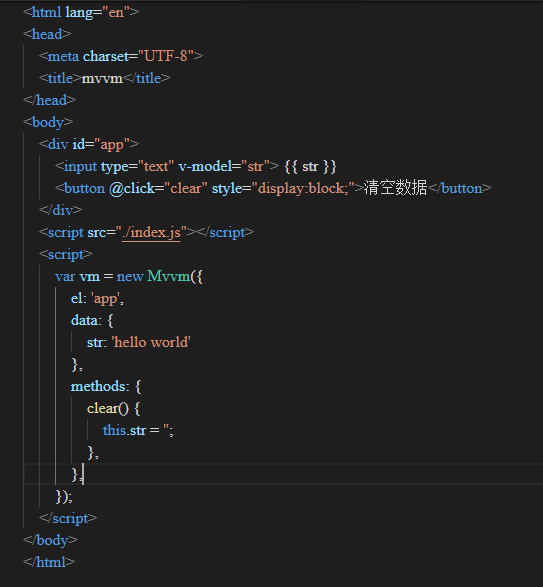
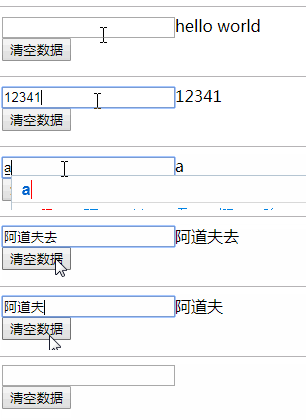
        <content type="html"><![CDATA[<p>用过 vue 的都知道双向绑定，双向绑定就是当 view 的数据改变的时候 data 的数据也会同时变化。vue 的双向绑定其实就是基于 Object.defineProperty 的数据劫持加上发布-订阅模式实现的。我们基于这两点来理一下实现的思路，我们要一个数据的观察者 observe 来实现对数据的劫持， 当数据变化的时候，我们要有一个事件的派发者通知订阅者实时更新数据，同时我们应该还要有一个 complie 来进行指令解析，将这些关联起来，先来看看最终实现的效果<br>
<img src="https://user-images.githubusercontent.com/44893721/55455070-bc4cdf80-5614-11e9-89ea-fb72997507f3.png" alt="L$IT(BW0 Q %TT7Q A9W_9Y" loading="lazy"><br>
<img src="https://user-images.githubusercontent.com/44893721/55455171-2f565600-5615-11e9-8b95-5669d8479f31.gif" alt="aaa" loading="lazy"></p>
<p>首先为了能像 vue 一样调用，我们先实现一个 mvvm 类，里面初始化传入的参数。</p>
<pre><code class="language-js">class Mvvm {
  constructor(option) {
    this.methods = option.methods; //方法
    this.data = option.data; // 数据
    this.target = null; //记录watcher
    this.element = document.getElementById(option.el); //获取根元素
    this.observe(this, this.data); //设立观察者对data里面的数据进行劫持
    this.compile(this.element); //指令解析，整合
  }
}
</code></pre>
<h2 id="observe">Observe</h2>
<p>Observe 取出 data 中所有的属性并对其进行劫持，在 Mvvm 类中添加 observe 方法</p>
<pre><code class="language-js">    observe(root, data) {
        for (let key in data) {
            this.definedRective(root, key, data[key])
        }
    }
    definedRective(root, key, value) {
        if (typeof value == 'object') {
            this.observe(value, value) //如果还有子属性还是对象递归取出
        }
        Object.defineProperty(root, key, {
            set(newVal) {
             if (value == newVal) return //如果数据没改变就直接返回
                value = newVal // 记录改变的值
            },
            get() {
                return value
            }
        })
    }
</code></pre>
<p>这里 observe 取出 data 中的属性数据，如果子属性还是个对象就进行递归，这样子属性如果发生了变化也能监听的到了。这个部分我们已经可以在数据变化的时候对数据进行拦截，但是我们要有一个事件的接收和派发调度员，让订阅消息的人可以实时的知道数据更新。</p>
<h2 id="dispatcher">Dispatcher</h2>
<p>Dispatcher 主要做的事情就是对事件的接受和发布，让监听的人可以实时的知道数据的更新并同步的对 dom 的数据进行更新。</p>
<pre><code class="language-js">class Dispatcher {
  constructor() {
    this.watchers = []; //监听者队列
  }
  add(watcher) {
    this.watchers.push(watcher); //接受监听者
  }
  notify(value) {
    console.log('更新');
    this.watchers.forEach(watcher =&gt; {
      watcher.update(value);
    }); //通知更新
  }
}
</code></pre>
<p>Dispatcher 其实就相当于一个调度员赋值事件的接受和发布，每当有新的 watcher 就添加进队列，当数据更新时，统一通知这些 watcher 我数据更新啦你也快更新吧。有了调度员，现在缺个订阅的我们来看下 watcher 怎么实现</p>
<h2 id="watcher">Watcher</h2>
<p>watcher 其实很简单就做一件事对节点的数据进行更新</p>
<pre><code class="language-js">class Watcher {
  constructor(node, type) {
    this.node = node; //监听的子节点
    this.type = type; // 子节点类型，不同子节点类型赋值方式不同
  }
  update(value) {
    if (this.type == 'input') {
      this.node.value = value;
    }
    if (this.type == 'text') {
      this.node.nodeValue = value;
    }
  }
}
</code></pre>
<p>现在有了 watcher,和 dispatcher 我们在对数据进行劫持的时候在 set get 中进行事件的发布和订阅</p>
<pre><code class="language-js">    definedRective(root, key, value) {
        if (typeof value == 'object') {
            this.observe(value, value)
        }
        const dep = new Dispatcher();//事件派发者
        Object.defineProperty(root, key, {
            set(newVal) {
                if (value == newVal) return //如果数据没改变就直接返回
                value = newVal // 记录改变的值
                dep.notify(newVal) //发布事件
            },
            get() {
                console.log('get', value)
                dep.add(this.target) //添加订阅者
                return value
            }
        })
    }
</code></pre>
<p>最后实现 complie 对 v-model 等指令进行解析，并新建订阅者</p>
<pre><code class="language-js">    compile(element) {
        const childNodes = element.childNodes;//获取所有子节点
        for (let node of childNodes) {
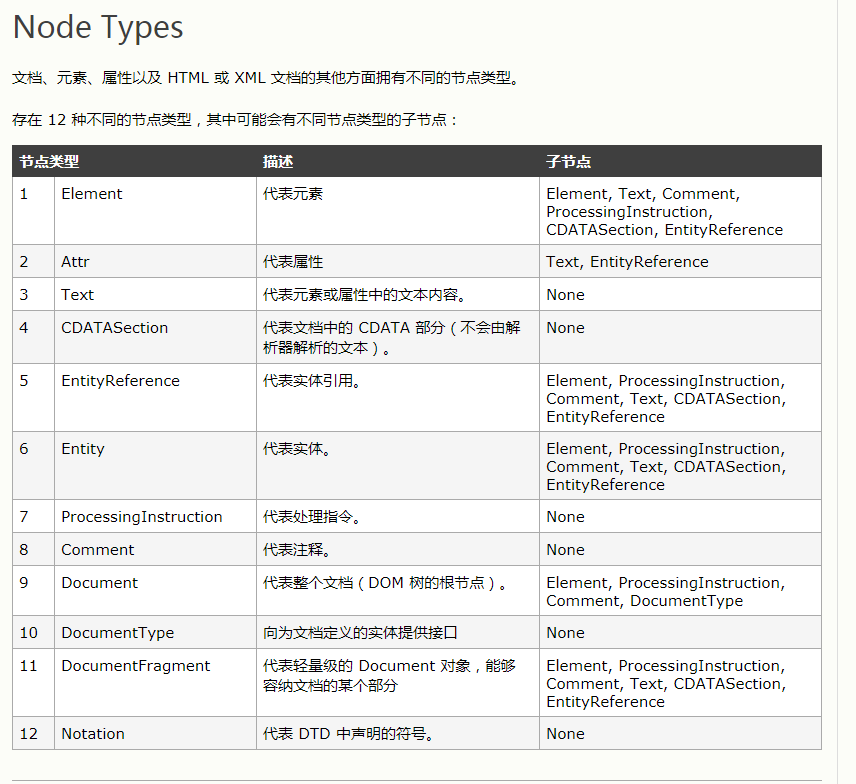
            if (node.nodeType == 1) {// nodetype属性在文末最后会附上解释，这里的1代表普通元素
                const attrs = node.attributes;//获取所有节点属性
                for (let attr of attrs) {
                    if (attr.name == 'v-model') { //解析v-model的指令
                        const name = attr.value
                        node.addEventListener('input', (e) =&gt; {
                            this[name] = e.target.value //监听数据input数据改变
                        })
                        this.target = new Watcher(node, 'input')
                        this[name] //触发劫持添加监听,一定要写这一句，因为这句其实就是获取data里面的值，一旦获取data的值就会触发get 将订阅者添加进订阅者集合
                    }
                    if (attr.name == '@click') {
                        const name = attr.value
                        node.addEventListener('click', this.methods[name].bind(this))
                    }
                }
            }
            if (node.nodeType == 3) {//nodeType等于3表示文本元素
                const reg = /\{\{(.*)\}\}/
                const match = node.nodeValue.match(reg)
                if (match) {
                    const name = match[1].trim()
                    this.target = new Watcher(node, 'text')
                    node.nodeValue = this.data[name]
                    this[name] //触发劫持添加监听
                }
            }
        }
    }
</code></pre>
<h2 id="nodetype-属性">nodetype 属性</h2>
<figure data-type="image" tabindex="1"><img src="https://user-images.githubusercontent.com/44893721/55458438-9d077f80-561f-11e9-96c0-1e9948093bea.jpg" alt="1554273976(1)" loading="lazy"></figure>
]]></content>
    </entry>
</feed>